/Customer5 min read
IBM CUGA and Tavily: Making Web Search a First-Class Tool
Guest written by the team at IBM Software Innovations Lab: Discover how Tavily powers web search as a first-class tool in CUGA, enabling agents to plan with trusted web results.

Agents don't fail the way you'd expect
Most agents that fall over on a live question are reasoning over bad search results, without knowing they’re bad.
In a single-shot chatbot, a mediocre result costs one mediocre answer. It’s not ideal, but not the end of the world either. In a planner-executor agent, however, the result is the input the next several decisions depend on. The planner reads the snippet, decides whether the sub-goal is met, and picks its next step from what it saw. If that snippet is a cookie banner or a nav menu, the agent plans wrong, causing a whole host of issues.
The question “Can it search?” is already answered. The real question now is whether a result comes back in a form the planner can trust, with no cleanup stage in between. That’s where Tavily comes in.
What CUGA is
CUGA, short for Configurable Generalist Agent, is a harness rather than a framework. The orchestration loop, the tool calling, the state management and the self-correction ship assembled, so teams configure them instead of wiring them together again. Point CUGA at a web UI, an OpenAPI service or an MCP server and it plans against that target, calls it, reads the response and revises when a step misfires. That design took CUGA to the top of AppWorld, a benchmark of 750 tasks across 457 real APIs, and to the top of WebArena before it.
The detail that matters here is uniformity. Every tool CUGA can reach is described to it the same way: an app with a set of APIs, each with parameters and a response schema. OpenAPI services look like that. MCP servers look like that. LangChain tools and plain Python functions look like that. So does web search.
Use case #1: a built-in tool in the core agent
Open CUGA's pyproject.toml and tavily-python is in the dependency list. Web search is off by default and turns on with a single setting. With the flag on, the registry creates a shared tool parameter called web with only one API, search web, described the same way an enterprise REST endpoint would be. The response schema it hands the planner is Tavily's response, one to one:
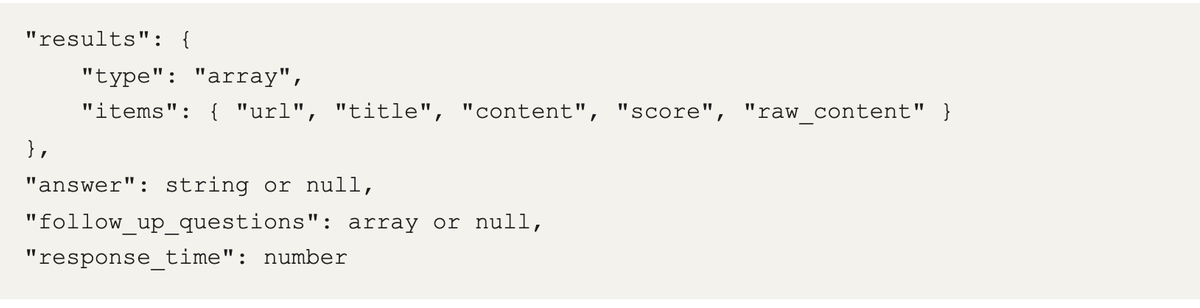
Tavily's response, published directly as the search_web contract.
The team didn't design a schema and then adapt Tavily to it. Tavily's own shape was already close enough to what a planner wants that CUGA could publish it as the tool contract. The payoff is architectural: the planner reasons over web results using the same machinery it uses for a typed internal API. Same planning, reflection, and check on whether a step satisfied the sub-goal.
The abstraction is easier to see in a run:
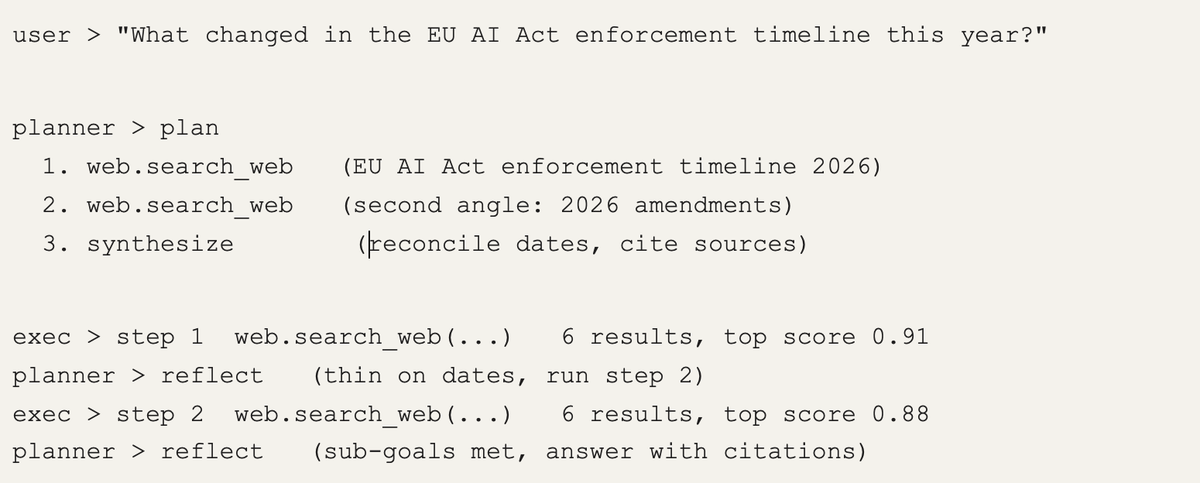
web shows up as one planned step among others, with the planner deciding whether it needs another.
Use case #2: Tavily behind MCP for the app gallery
To demonstrate what real-world production setups look like, we built the cuga-apps gallery, which is a collection of open-source, single-purpose AI assistants and interactive workflows designed to be cloned and deployed in minutes. The core agent embeds Tavily directly. The cuga-apps gallery needed the opposite: one search backend that two dozen independent apps could share without each one carrying a key. So, there's a small MCP server, mcp-web, running on IBM Code Engine with the key in a server-side secret. The apps that call it, and the people cloning them, never handle a Tavily key at all.
Two small, but important, choices came along for free: web search is gated by a flag, and its key never lives inside the agent. Both look like housekeeping until you deploy past a laptop.
What it looks like when a real app leans on it
Two apps in the gallery mark the ends of the range. Web Researcher is the obvious one. Its system prompt forbids the model from trusting its own training data, so it runs two to four angles on every question, synthesizes a report with a confidence rating, and cites a URL for every claim. The interesting part is what isn't there. There is no:
- Parsing step
- Clean-the-HTML tool
- Retry logic around malformed results
Ouroboros, a CUGA app, is the less obvious one, a seven-agent lead-generation system. Its person finder uses /search to a link in a chain, passing the content field of each hit to a downstream step that infers a likely email pattern. If that field were noisy, the error would compound through every stage after it.
Why Tavily specifically
The decision for CUGA to choose Tavily was simple; the output was already shaped like something an agent consumes, which is the tedious part to build yourself:
- Content is the readable part, not the raw page. For a planner reading snippets to decide a next step, that's the difference between one clean input and a cleanup subroutine you maintain forever.
- Every result carries a relevance score. When you're truncating to the top few results to fit a context budget (and an agent always is), a numeric score is a real signal rather than a guess.
- The response maps straight onto a tool schema. Tavily's response is published as the search_web contract. No translation layer means no translation bugs.
- One dependency, key server-side. That's what made it possible to offer web search two ways, embedded and via MCP, without either path becoming a project of its own.
None of that is flashy. It's the difference between an agent you can trust on live information and one you can't. When the backend does that part well, the agent code above it stays small, and small agent code is what CUGA is built for.
Our best advice for doing this
- Make search a tool in your abstraction, not a special path. The single best decision we made was refusing to give web search its own bespoke handling. It’s an AppDefinition with a schema. Everything the agent already does with tools — planning over them, reflecting on their output, retrying — then works on search for free.
- Publish the backend’s schema, don’t invent your own. We were ready to design a search response format and adapt to it. We didn’t need to, because Tavily’s shape was already agent-shaped. Every adapter you skip is a class of bug you skip.
- Keep the key server-side. Embedding the key in each app doesn’t scale past the first app. A shared MCP server with the secret behind it means the people cloning your code never touch a key and never leak one.
- Gate it behind a flag. enable_web_search is off by default in CUGA. Web access is a capability with a cost and a blast radius; it should be a deliberate opt-in, not something that’s silently always on.
Try it
It’s one install to start, and the built-in web tool is a single flag away:
# install the harness
pip install cuga
# then, to give the agent Tavily-backed web search:
export TAVILY_API_KEY=...
# set advanced_features.enable_web_search = true
- CUGA agent — the harness, including the built-in Tavily tool: github.com/cuga-project/cuga-agent
- The app gallery — two dozen working apps, several of which call mcp-web: the cuga-apps write-up
- Tavily — the search backend both paths run on: tavily.com
Turn on web search, set TAVILY_API_KEY, and ask CUGA something it can’t know from training data. Watch the trace: the planner calls web, reads the content and score of what comes back, and picks its next step — treating a live web result with the same confidence it gives an internal API.
It can plan that confidently because Tavily did the hard part: turning the open web into something clean enough to plan on. Try it out here - ready, set, go!